DO Patent FAQs
General Information
What is DO Patent?
DO Patent is an AI tool that identifies and converts chemical images within patents, journal articles and other PDF documents into SMILES strings (a convenient format for subsequent data processing).
How much does it cost to use DO Patent?
Subscription is FREE.
You can process 50 pages for FREE every month. After 50 pages, the cost of each page depends on your subscription tier. Pricing for tiers is below:
- $0.10 per page for Standard Tier
- $0.06 per page for Academic Tier
How long does processing take?
It takes about 30 minutes to process a typical patent (ca. 120 pages). Multiple patents can be uploaded for processing at once, however total time to finish may vary.
Can I submit documents other than patents?
Yes, you can submit any PDF document with chemical images (e.g., journal articles). However, DO Patent has been optimized for processing patents.
What is DO Patent accuracy?
The AI engine in DO Patent is transparent about its recognition confidence:
0.98 confidence score = likely accurate structure
- 0.92-0.98 = manual review is necessary
- <0.92 = consider discarding
We have tested DO Patent across a diverse set of patents and found 99.9% accuracy for individual structural elements when the confidence score is above 0.98. Rare mistake can be easily corrected in the Results view.
We continuously work to improve accuracy across broader diversity of chemical structures. Current known problematic cases include recognition of Ts, SEM, Bn and Boc abbreviations.
How can I correct recognition errors?
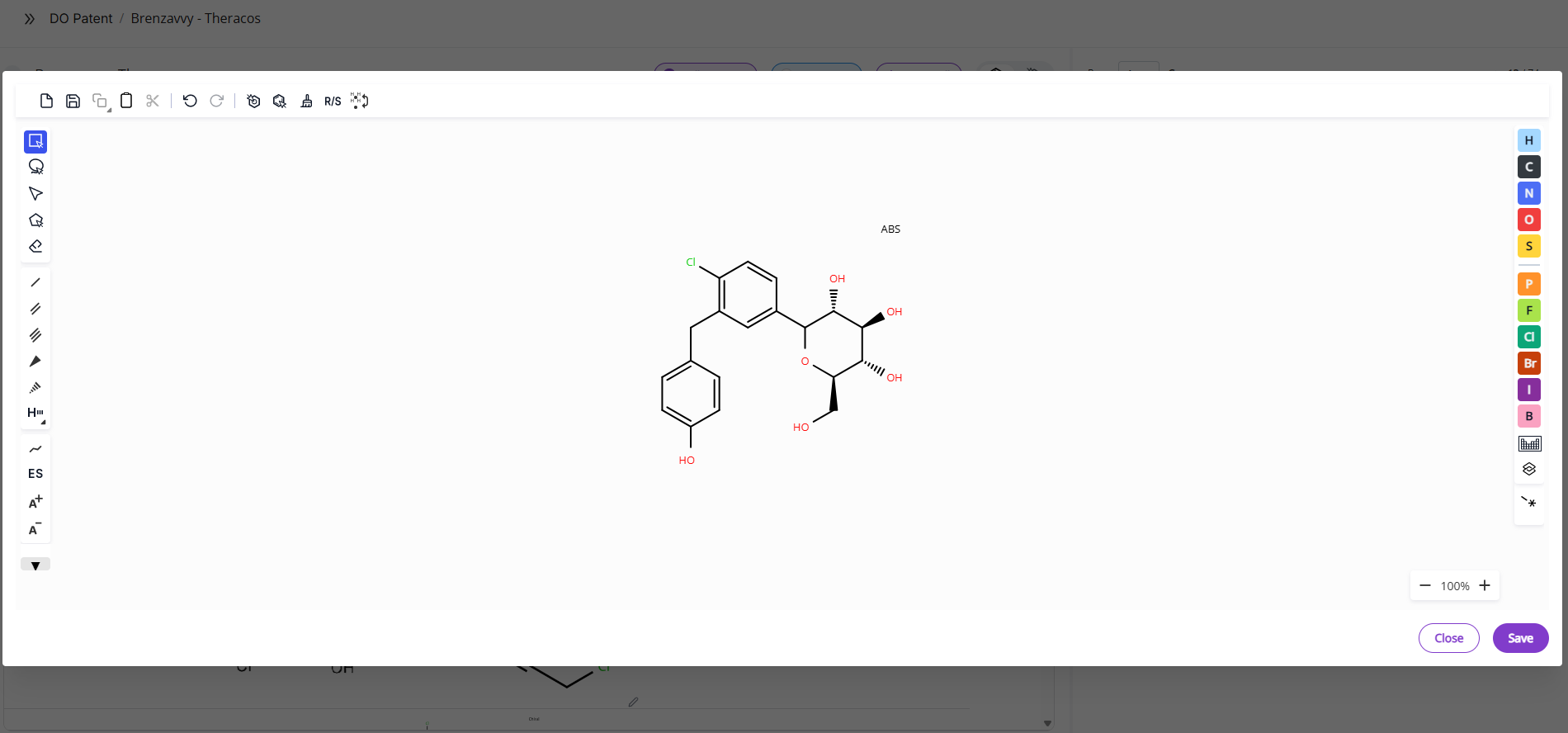
Open the Results view. Find the structure that you want to correct (you can sort structures by page or by confidence score) and click on the structure the you want to edit. An editor will open where you can make the necessary modifications. Once you save changes, the molecule will be automatically updated.
What is the difference between full molecules and fragments?
A full molecule is a molecule without open valences. Fragments are molecules with open valences or variable atoms. Currently, the algorithm assigns Markush structures to fragments.
Getting Started
How do I access DO Patent?
Sign up via the Deep Origin portal.
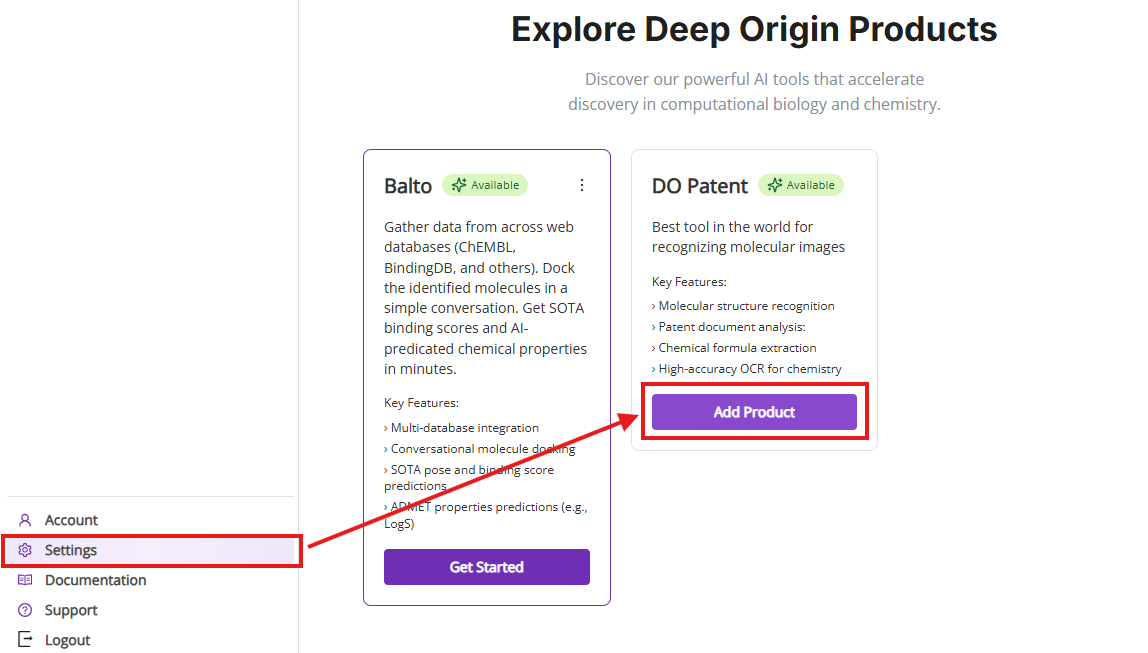
You can access DO Patent in two ways:
- After you log into your account for the first time, you will see a welcome window allowing you to activate DO Patent for your account.
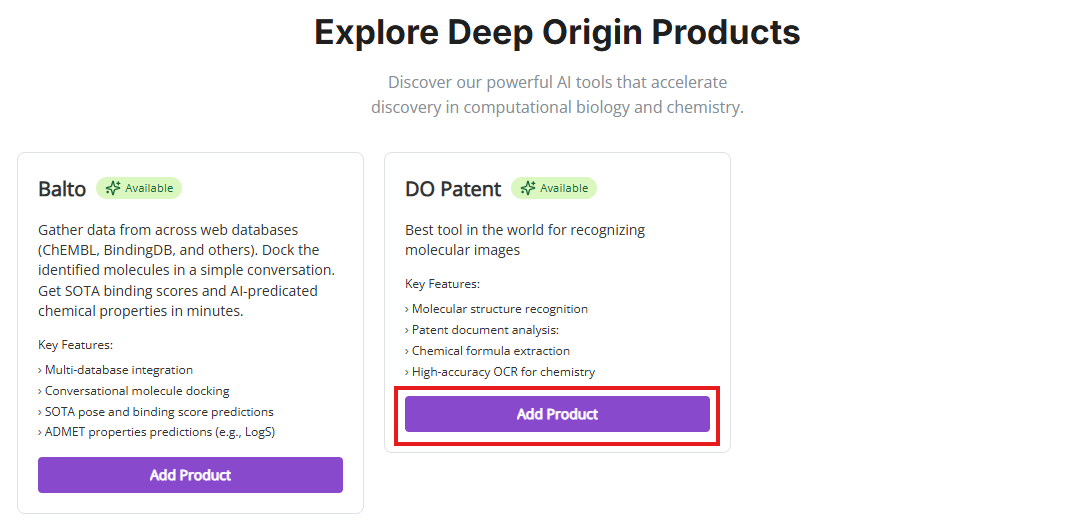
- When you log in to your account at later times, you can go to settings and then click on “Add Product” button for DO Patent.
How do I start using DO Patent?
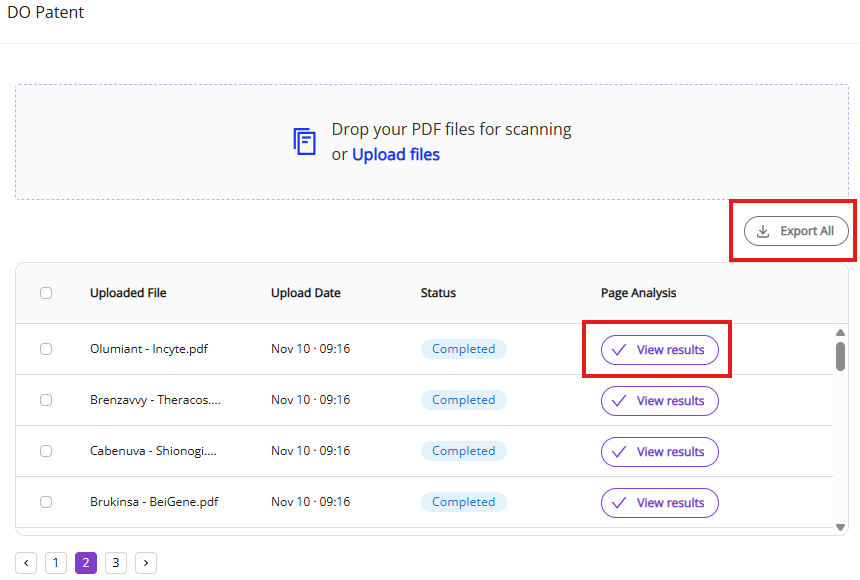
Just drag and drop your PDF document onto the box at the top of the screen. DO Patent will begin processing the patent and will give you status updates. Once the patent has been processed, you can either download data in an Excel format or inspect and edit results by clicking on View Results button.
Input and Output
What are the usage limits?
- Upload limit: 1 Gb or ca. 150 files per batch
How do I resolve an Insufficient Funds error?
If the document that you are trying to submit exceed free page limit, then you will see an error indicating that you have insufficient funds. You just need to add a payment method to continue processing the large document.
How do I read the DO Patent output?
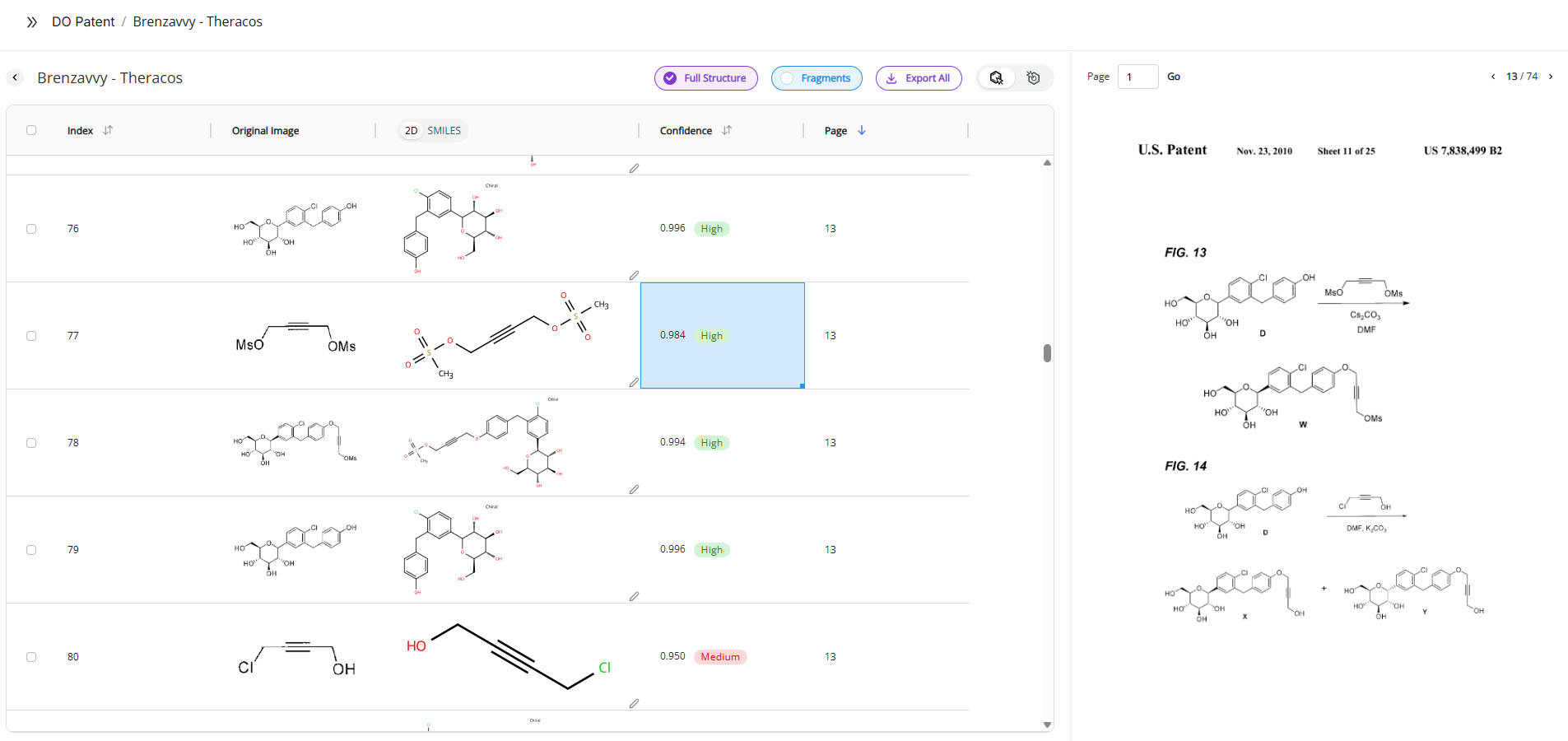
DO Patent output consists of several columns for recognition quality assessment and subsequent data processing:
- ID
- This column approximated order in which molecules and fragments appear in the document
- Original image
- This images shows exactly how our algorithm recognized the molecule in the document. Direct comparison between the original image and the recognized molecule facilitates data curation.
- Note: Clicking on the row will show the exact page in the PDF viewer from which the molecule was extracted so you can review broader context associated with the molecule.
- This images shows exactly how our algorithm recognized the molecule in the document. Direct comparison between the original image and the recognized molecule facilitates data curation.
- 2D-to-SMILES toggle
- This toggle allows to switch between 2D rendering of recognized SMILES and the SMILES format for each recognized molecule
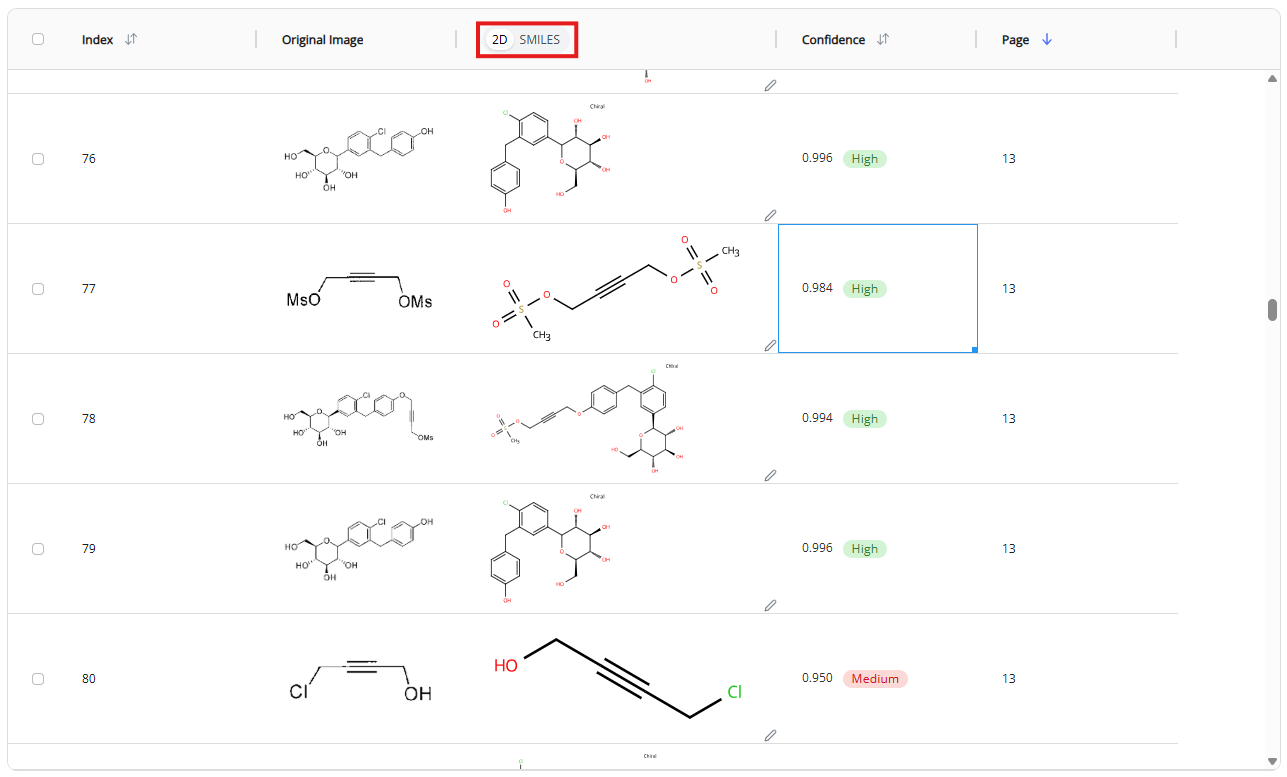
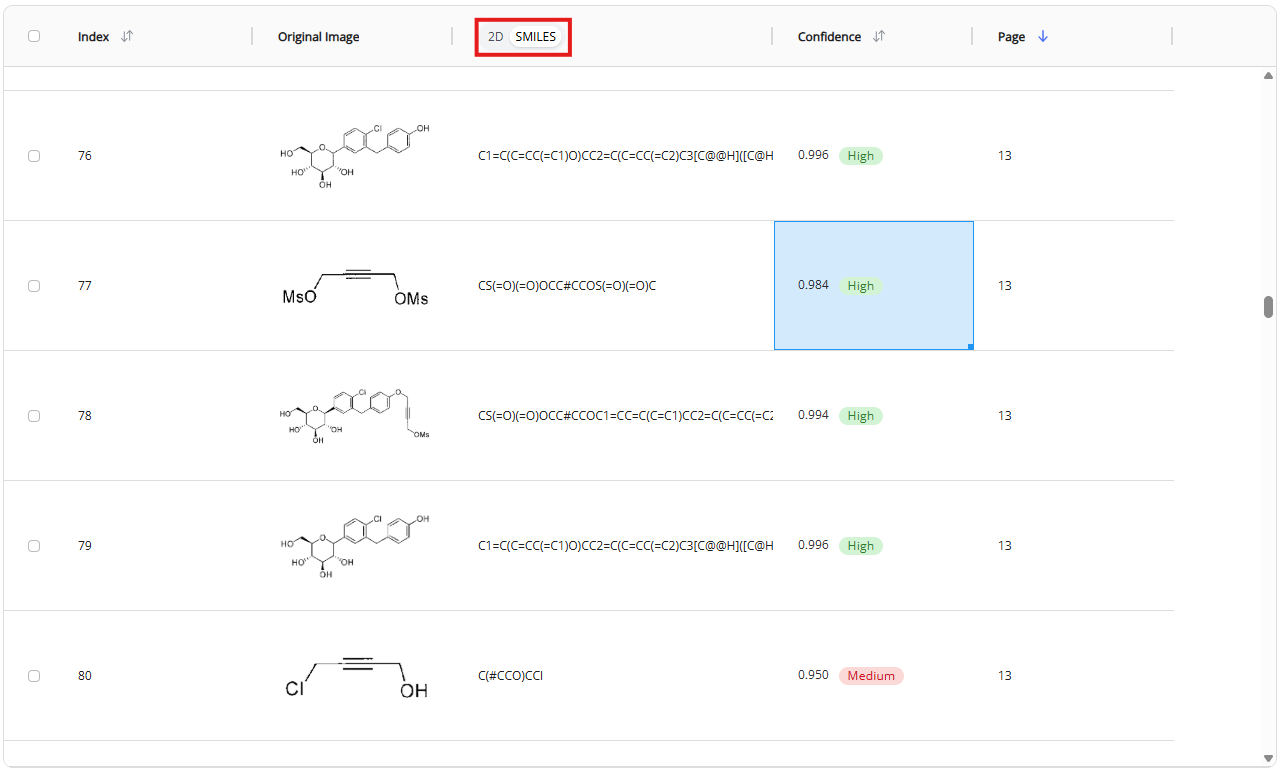
- Confidence score
- This score shows the confidence level of our AI engine for each recognized molecule. There are three confidence levels:
- High (>0.98 confidence score) - Likely accurate structure
- Note: Fraction of molecules with high confidence score depends on the document type and formatting. On average, 73% of molecules in the US patents are recognized with the high confidence score.
- Note: See DO Patent accuracy section for more details about segmentation and recognition accuracies. High confidence molecules gave 97.3% of accurate molecules. The molecule was considered inaccurate when either one atom or one bond were recognized wrong. Recognition of individual structural elements (atoms and bonds) is 99.9% for the molecules with the high confidence score
- Medium (0.92-0.98 confidence score) - Needs manual review
- Note: Fraction of molecules with medium confidence score depends on the document type and formatting. On average, 22% of molecules in the US patents are recognized with the high confidence score.
- Note: Recognition accuracy is highly dependent on document formatting (see DO Patent documentation for more details)
- Low (<0.92 confidence score) - Consider discarding
- High (>0.98 confidence score) - Likely accurate structure
- This score shows the confidence level of our AI engine for each recognized molecule. There are three confidence levels:
- Page
- This column lists the page in the document from which its molecular structure was identified and recognized
- Note: You can also click on the row to see the exact page in the PDF viewer
How do I correct the recognition result?
Double click on the structure that you want to edit. The molecular editor will open where you can modify the structure. Once you made the correction, save the changes and the record with this molecule will be automatically updated.
Pricing & Billing
Do I need to enter a credit card number to use DO Patent?
No, a credit card is not necessary. The first 50 pages are FREE every month.
How can I get an Academic Tier pricing?
You will automatically be assigned the academic tier if you sign up with your .edu account.
How does DO Patent calculate cost?
DO Patent jobs are counted as “PDF analysis” jobs for pricing and billing. PDF analysis jobs have both an associated cost per page and a number of free pages allowed each month. Free pages are consumed first. Pages in excess of free pages will be charged according to the table below. If you would like to adjust your pricing tier or discuss additional pricing options, please contact support at support@deeporigin.com.
| Number of Free Actions per Month | Academic Tier Price per Page | Standard Tier Price per Page | |
|---|---|---|---|
| PDF Analysis | 50 pages | $0.06 | $0.10 |
How do I limit my spending by DO Patent?
You can set an auto-approval threshold for each submitted document. The system will ask for your permission every time you submits a document or a batch of documents if it exceeds this threshold.
You can see and edit your auto-approval threshold in the Billing section of your account portal once you entered your payment information.
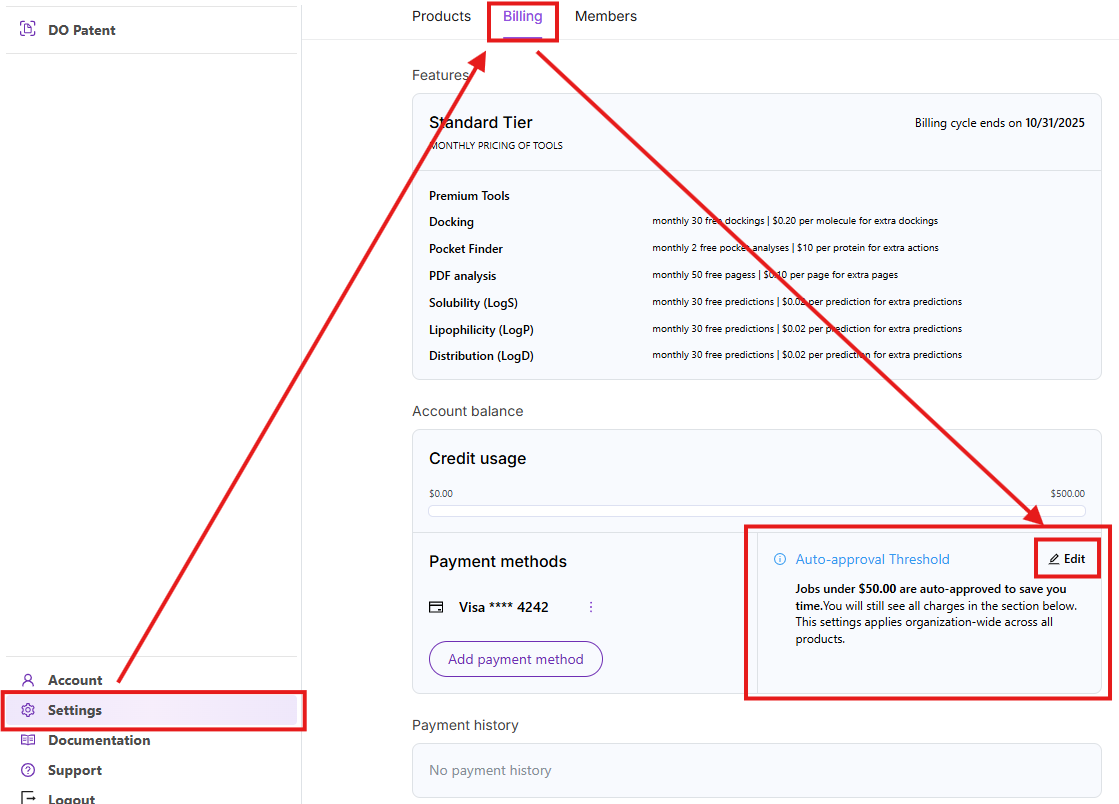
Click on the edit button and set the auto-approval threshold that you want. The system will ask for permission to proceed if the job will cost more than your auto-approval threshold.

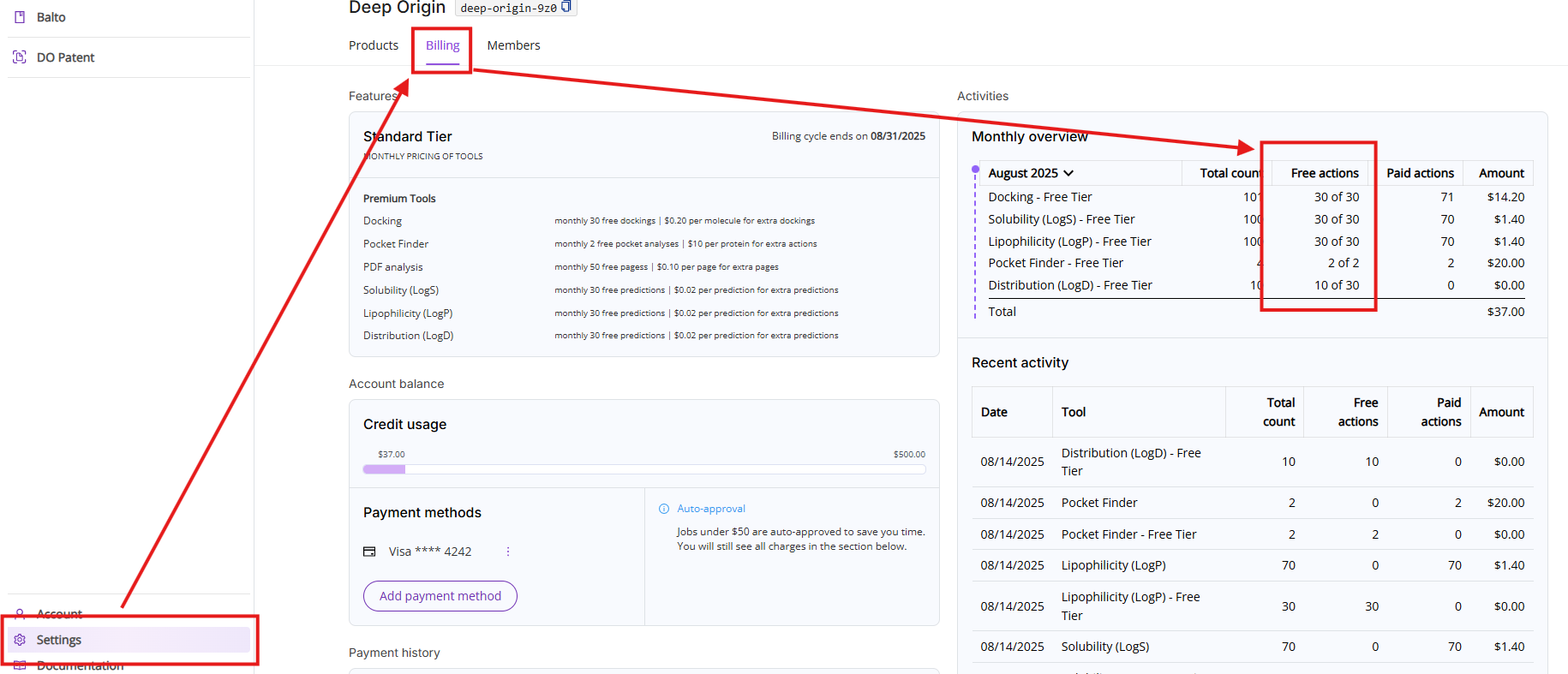
How do I know how many free actions I have left?
Go to Settings then click on Billing tab to see your monthly free pages (actions) count.
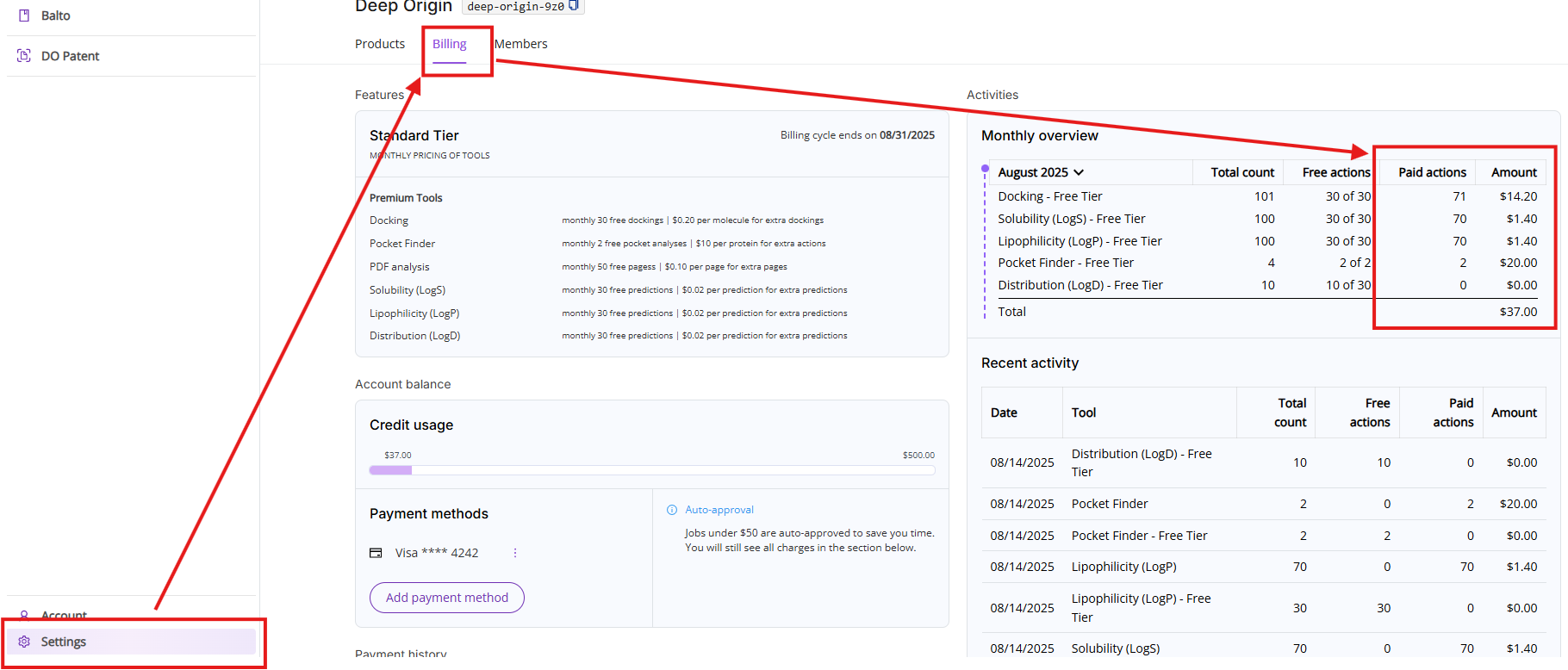
How do I know how many pages were analyzed as paid actions?
You can see the number of paid pages (actions) used each month by going to the “Billing” tab under Settings. You can also see the monthly quota of free pages and remaining free pages in the same dashboard.
How often is my credit card charged?
The credit card on file will be charged on the 2nd or 3rd of each month for pages analyzed in excess of free pages the previous month.
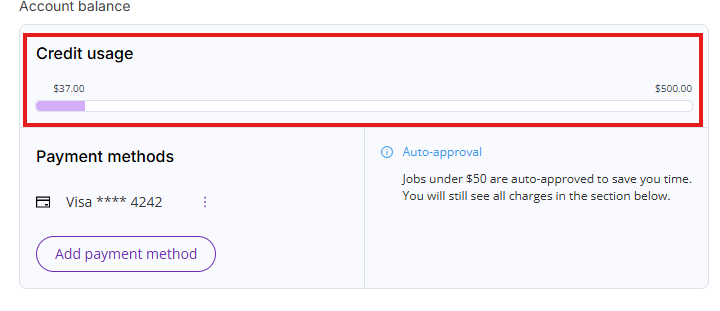
What does “Available Credit” mean in the Billing tab?
DO Patent will only charge you for analyzed pages in excess of free pages at the end of the month. During the month, you can accumulate a number of paid pages (actions) before your credit card will be charged. Every user has a limit to the number of analyzed pages that can be performed prior to the card on file being charged. You can see how close you are to your personal limit in the Available Credit section of the Billing tab. Once you have hit your credit limit for paid pages (actions), you will not be able to process additional pages without contacting our support team at support@deeporigin.com.
I would like to pay with a purchase order (PO) instead of a credit card. How do I enable this?
Please, contact our customer support team for this request at support@deeporigin.com.
Account Management
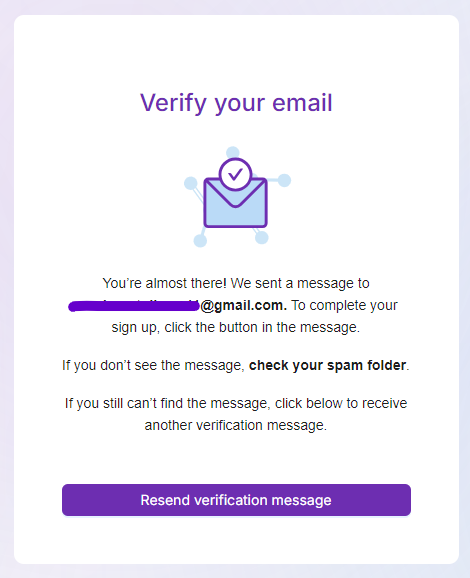
I did not receive an email confirmation. What should I do?
Check your spam folder first. If you still can’t find the confirmation email, click on “Resend verification message” or contact customer support at support@deeporigin.com.
How can I manage my account details?
Click on Account menu on the left panel to update:
- Your name
- Your title
- Your Company
- Your password
How can I add or remove products from my collection?
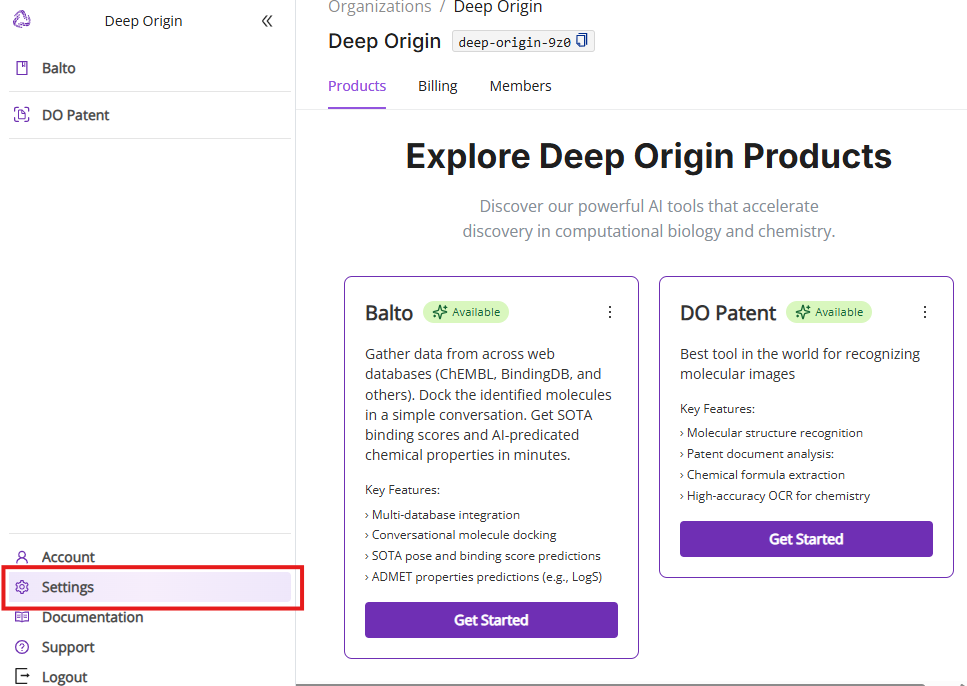
Click on Settings menu to update selection of your active Deep Origin products.
How do I invite team members?
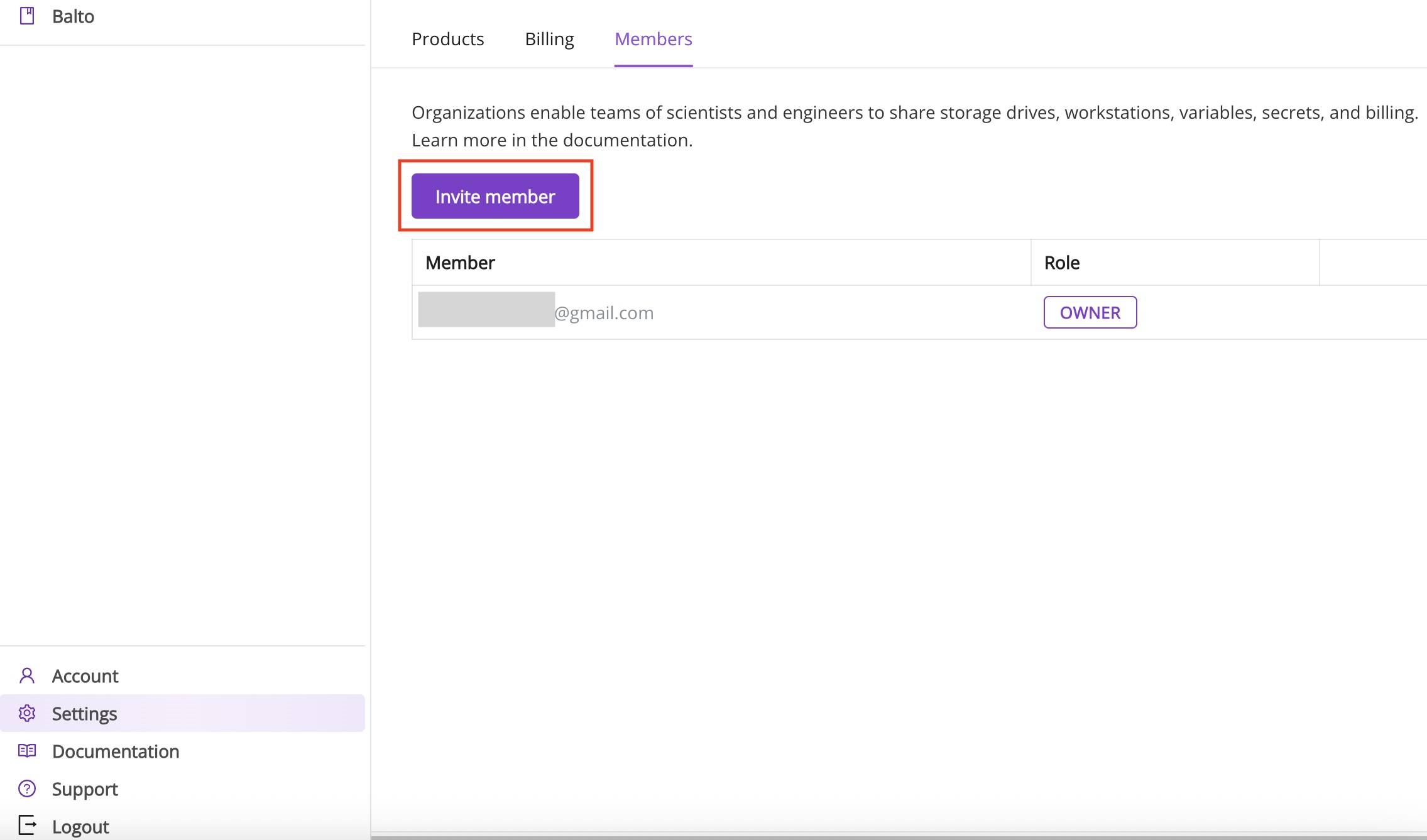
To add colleagues, go to the Members section from Settings in the left panel and click the Invite Member button. This lets you invite team members from your organization to collaborate within DO Patent.
Security & Privacy
What is your privacy policy?
Your privacy is extremely important to us. You data is handled according to our Privacy Policy.
Work Data: Identity of submitted documents and extracted data remain private to your account (and any members in your DO Patent “organization”).
You can delete these data at any time, or request permanent deletion by contacting our customer support team at support@deeporigin.com.
Data Retention: Data is removed from our servers after 90 days of account inactivity.
Contact & Support Options
How do I ask for support?
For assistance, contact our support team at support@deeporigin.com. Our team will get back to you within 24 business hours.
How can I request new features?
We welcome your suggestions! If you have ideas or requests for new features, please reach out to our team at support@deeporigin.com.